
RessourcenDWG-Symbolbibliotheken
Kostenlose SPS-Kontaktplan-Symbole für AutoCAD (DWG): Kontakte, Spulen, Zeitglieder, Zähler, E/A-Baugruppen
78 SPS-Symbole als sofort nutzbare AutoCAD-Blöcke: Kontaktplan-Kontakte und -Spulen (Schließer, Öffner, steigende und fallende Flanke, Setzen und Rücksetzen), Stromschienen und Beispielzweige, die Standard-Funktionsbausteine (TON, TOF, TP, CTU, CTD, CTUD, Flankendetektoren, Flipflops, Vergleich und Arithmetik), SPS-Baugruppenträger, Netzteil, CPU und E/A-Baugruppen (digital, analog, Widerstandsthermometer, Thermoelement, schneller Zähler, Kommunikation) und typische Feldverdrahtung: Drei-Draht-Sensoren (PNP und NPN), Schalter, Leuchten, Spulen, Magnetventile, Zwei- und Vier-Draht-Messumformer mit 4-20 mA, Widerstandsthermometer, Thermoelement, 0-10 V und Drehgeber. Variablen, Adressen, Steckplätze und Kennzeichen stecken in Attributen, sodass sich E/A-Listen direkt aus den Zeichnungen lesen lassen.
Frei nutzbar und veränderbar in Ihren eigenen Projekten, auch kommerziellen. Die ZIP-Datei enthält eine einfache DWG-Datei im AutoCAD-2018-Format und eine README; kein Add-in nötig. Bereitgestellt wie besehen, ohne Gewähr.
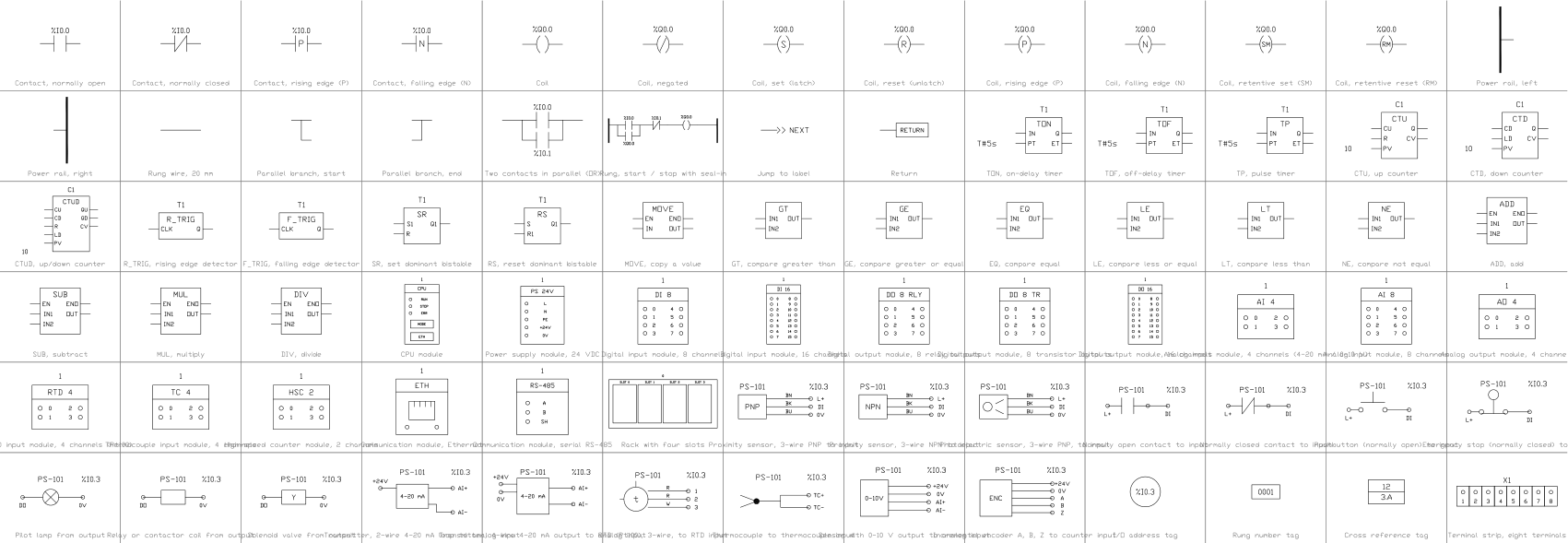
Alle 78 Symbole
78 von 78 Symbolen

Contact, normally open
PLC_LD_CONTACT_NOAttribute
TAGVARCOMMENTADDRESSREMARKSDESC
Contact, normally closed
PLC_LD_CONTACT_NCAttribute
TAGVARCOMMENTADDRESSREMARKSDESC
Contact, rising edge (P)
PLC_LD_CONTACT_PAttribute
TAGVARCOMMENTADDRESSREMARKSDESC
Contact, falling edge (N)
PLC_LD_CONTACT_NAttribute
TAGVARCOMMENTADDRESSREMARKSDESC
Coil
PLC_LD_COILAttribute
TAGVARCOMMENTADDRESSREMARKSDESC
Coil, negated
PLC_LD_COIL_NEGAttribute
TAGVARCOMMENTADDRESSREMARKSDESC
Coil, set (latch)
PLC_LD_COIL_SETAttribute
TAGVARCOMMENTADDRESSREMARKSDESC
Coil, reset (unlatch)
PLC_LD_COIL_RESETAttribute
TAGVARCOMMENTADDRESSREMARKSDESC
Coil, rising edge (P)
PLC_LD_COIL_PAttribute
TAGVARCOMMENTADDRESSREMARKSDESC
Coil, falling edge (N)
PLC_LD_COIL_NAttribute
TAGVARCOMMENTADDRESSREMARKSDESC
Coil, retentive set (SM)
PLC_LD_COIL_RETAIN_SETAttribute
TAGVARCOMMENTADDRESSREMARKSDESC
Coil, retentive reset (RM)
PLC_LD_COIL_RETAIN_RESETAttribute
TAGVARCOMMENTADDRESSREMARKSDESC
Power rail, left
PLC_LD_RAIL_LEFTAttribute
TAGDESC
Power rail, right
PLC_LD_RAIL_RIGHTAttribute
TAGDESC
Rung wire, 20 mm
PLC_LD_WIREAttribute
TAGDESC
Parallel branch, start
PLC_LD_BRANCH_OPENAttribute
TAGDESC
Parallel branch, end
PLC_LD_BRANCH_CLOSEAttribute
TAGDESC
Two contacts in parallel (OR)
PLC_LD_PARALLELAttribute
TAGVAR_1VAR_2DESC
Rung, start / stop with seal-in
PLC_LD_RUNG_SEAL_INAttribute
TAGSTARTSEALSTOPOUTDESC
Jump to label
PLC_LD_JUMPAttribute
TAGLABELDESC
Return
PLC_LD_RETURNAttribute
TAGDESC
TON, on-delay timer
PLC_FB_TONAttribute
TAGINSTANCEPTDESC
TOF, off-delay timer
PLC_FB_TOFAttribute
TAGINSTANCEPTDESC
TP, pulse timer
PLC_FB_TPAttribute
TAGINSTANCEPTDESC
CTU, up counter
PLC_FB_CTUAttribute
TAGINSTANCEPVDESC
CTD, down counter
PLC_FB_CTDAttribute
TAGINSTANCEPVDESC
CTUD, up/down counter
PLC_FB_CTUDAttribute
TAGINSTANCEPVDESC
R_TRIG, rising edge detector
PLC_FB_R_TRIGAttribute
TAGINSTANCEDESC
F_TRIG, falling edge detector
PLC_FB_F_TRIGAttribute
TAGINSTANCEDESC
SR, set dominant bistable
PLC_FB_SRAttribute
TAGINSTANCEDESC
RS, reset dominant bistable
PLC_FB_RSAttribute
TAGINSTANCEDESC
MOVE, copy a value
PLC_FB_MOVEAttribute
TAGDESC
GT, compare greater than
PLC_FB_GTAttribute
TAGDESC
GE, compare greater or equal
PLC_FB_GEAttribute
TAGDESC
EQ, compare equal
PLC_FB_EQAttribute
TAGDESC
LE, compare less or equal
PLC_FB_LEAttribute
TAGDESC
LT, compare less than
PLC_FB_LTAttribute
TAGDESC
NE, compare not equal
PLC_FB_NEAttribute
TAGDESC
ADD, add
PLC_FB_ADDAttribute
TAGDESC
SUB, subtract
PLC_FB_SUBAttribute
TAGDESC
MUL, multiply
PLC_FB_MULAttribute
TAGDESC
DIV, divide
PLC_FB_DIVAttribute
TAGDESC
CPU module
PLC_MOD_CPUAttribute
TAGSLOTMODULE_TYPEADDRESS_STARTCHANNELSSIGNALPART_NOMANUFACTURERREMARKSDESC
Power supply module, 24 VDC
PLC_MOD_PSUAttribute
TAGSLOTINPUTOUTPUTPART_NOMANUFACTURERREMARKSDESC
Digital input module, 8 channels
PLC_MOD_DI8Attribute
TAGSLOTMODULE_TYPEADDRESS_STARTCHANNELSSIGNALPART_NOMANUFACTURERREMARKSDESC
Digital input module, 16 channels
PLC_MOD_DI16Attribute
TAGSLOTMODULE_TYPEADDRESS_STARTCHANNELSSIGNALPART_NOMANUFACTURERREMARKSDESC
Digital output module, 8 relay outputs
PLC_MOD_DO8_RELAYAttribute
TAGSLOTMODULE_TYPEADDRESS_STARTCHANNELSSIGNALPART_NOMANUFACTURERREMARKSDESC
Digital output module, 8 transistor outputs
PLC_MOD_DO8_TRANSISTORAttribute
TAGSLOTMODULE_TYPEADDRESS_STARTCHANNELSSIGNALPART_NOMANUFACTURERREMARKSDESC
Digital output module, 16 channels
PLC_MOD_DO16Attribute
TAGSLOTMODULE_TYPEADDRESS_STARTCHANNELSSIGNALPART_NOMANUFACTURERREMARKSDESC
Analog input module, 4 channels (4-20 mA / 0-10 V)
PLC_MOD_AI4Attribute
TAGSLOTMODULE_TYPEADDRESS_STARTCHANNELSSIGNALPART_NOMANUFACTURERREMARKSDESC
Analog input module, 8 channels
PLC_MOD_AI8Attribute
TAGSLOTMODULE_TYPEADDRESS_STARTCHANNELSSIGNALPART_NOMANUFACTURERREMARKSDESC
Analog output module, 4 channels
PLC_MOD_AO4Attribute
TAGSLOTMODULE_TYPEADDRESS_STARTCHANNELSSIGNALPART_NOMANUFACTURERREMARKSDESC
RTD input module, 4 channels (Pt100)
PLC_MOD_RTD4Attribute
TAGSLOTMODULE_TYPEADDRESS_STARTCHANNELSSIGNALPART_NOMANUFACTURERREMARKSDESC
Thermocouple input module, 4 channels
PLC_MOD_TC4Attribute
TAGSLOTMODULE_TYPEADDRESS_STARTCHANNELSSIGNALPART_NOMANUFACTURERREMARKSDESC
High-speed counter module, 2 channels
PLC_MOD_HSCAttribute
TAGSLOTMODULE_TYPEADDRESS_STARTCHANNELSSIGNALPART_NOMANUFACTURERREMARKSDESC
Communication module, Ethernet
PLC_MOD_COMM_ETHAttribute
TAGSLOTMODULE_TYPEADDRESS_STARTCHANNELSSIGNALPART_NOMANUFACTURERREMARKSDESC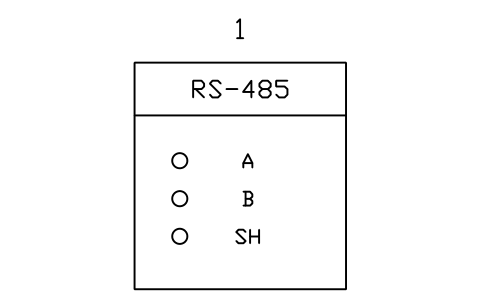
Communication module, serial RS-485
PLC_MOD_COMM_SERIALAttribute
TAGSLOTMODULE_TYPEADDRESS_STARTCHANNELSSIGNALPART_NOMANUFACTURERREMARKSDESC
Rack with four slots
PLC_RACK_4Attribute
TAGRACKPART_NOMANUFACTURERREMARKSDESC
Proximity sensor, 3-wire PNP to input
PLC_FIELD_PROX_PNPAttribute
TAGADDRESSDESCRIPTIONCABLEPART_NOMANUFACTURERREMARKSDESC
Proximity sensor, 3-wire NPN to input
PLC_FIELD_PROX_NPNAttribute
TAGADDRESSDESCRIPTIONCABLEPART_NOMANUFACTURERREMARKSDESC
Photoelectric sensor, 3-wire PNP, to input
PLC_FIELD_PHOTO_PNPAttribute
TAGADDRESSDESCRIPTIONCABLEPART_NOMANUFACTURERREMARKSDESC
Normally open contact to input
PLC_FIELD_CONTACT_NOAttribute
TAGADDRESSDESCRIPTIONCABLEPART_NOMANUFACTURERREMARKSDESC
Normally closed contact to input
PLC_FIELD_CONTACT_NCAttribute
TAGADDRESSDESCRIPTIONCABLEPART_NOMANUFACTURERREMARKSDESC
Pushbutton (normally open) to input
PLC_FIELD_PUSHBUTTONAttribute
TAGADDRESSDESCRIPTIONCABLEPART_NOMANUFACTURERREMARKSDESC
Emergency stop (normally closed) to input
PLC_FIELD_ESTOPAttribute
TAGADDRESSDESCRIPTIONCABLEPART_NOMANUFACTURERREMARKSDESC
Pilot lamp from output
PLC_FIELD_LAMPAttribute
TAGADDRESSDESCRIPTIONCABLEPART_NOMANUFACTURERREMARKSDESC
Relay or contactor coil from output
PLC_FIELD_COILAttribute
TAGADDRESSDESCRIPTIONCABLEPART_NOMANUFACTURERREMARKSDESC
Solenoid valve from output
PLC_FIELD_SOLENOIDAttribute
TAGADDRESSDESCRIPTIONCABLEPART_NOMANUFACTURERREMARKSDESC
Transmitter, 2-wire 4-20 mA loop to analog input
PLC_FIELD_4_20MA_2WIREAttribute
TAGADDRESSDESCRIPTIONCABLEPART_NOMANUFACTURERREMARKSDESC
Transmitter, 4-wire 4-20 mA output to analog input
PLC_FIELD_4_20MA_4WIREAttribute
TAGADDRESSDESCRIPTIONCABLEPART_NOMANUFACTURERREMARKSDESC
RTD (Pt100), 3-wire, to RTD input
PLC_FIELD_RTD_3WIREAttribute
TAGADDRESSDESCRIPTIONCABLEPART_NOMANUFACTURERREMARKSDESC
Thermocouple to thermocouple input
PLC_FIELD_THERMOCOUPLEAttribute
TAGADDRESSDESCRIPTIONCABLEPART_NOMANUFACTURERREMARKSDESC
Sensor with 0-10 V output to analog input
PLC_FIELD_0_10VAttribute
TAGADDRESSDESCRIPTIONCABLEPART_NOMANUFACTURERREMARKSDESC
Incremental encoder A, B, Z to counter input
PLC_FIELD_ENCODERAttribute
TAGADDRESSDESCRIPTIONCABLEPART_NOMANUFACTURERREMARKSDESC
I/O address tag
PLC_TAG_IOAttribute
TAGADDRESSDESCRIPTIONDESC
Rung number tag
PLC_TAG_RUNGAttribute
TAGRUNGCOMMENTDESC
Cross reference tag
PLC_TAG_XREFAttribute
TAGSHEETCOLUMNDESC
Terminal strip, eight terminals
PLC_TAG_TERMINAL_STRIPAttribute
TAGSTRIPDESC
Attribute für Stücklisten
Kontakte und Spulen zeigen ihre Variable oder Adresse in einem sichtbaren Attribut (VAR); COMMENT und ADDRESS sind unsichtbare Felder. Funktionsbausteine haben INSTANCE, Zeitglieder und Zähler zusätzlich PT oder PV. Baugruppen haben SLOT, MODULE_TYPE, ADDRESS_START, CHANNELS und SIGNAL; Feldverdrahtungssymbole haben TAG und ADDRESS; die Kennzeichen für E/A-Adresse, Strompfad und Querverweis tragen ADDRESS, RUNG, SHEET und COLUMN.
Exportieren Sie die Blöcke aller Zeichnungen mit BlockSync nach Excel, erstellen Sie daraus eine E/A-Liste oder Baugruppenliste, gleichen Sie sie mit dem SPS-Programm ab und schreiben Sie Korrekturen in einem Durchgang mit Vorschau und Sicherung zurück.
So verwenden Sie die Bibliothek
- Entpacken Sie die Datei und öffnen Sie die DWG. Kopieren Sie die benötigten Symbole in Ihren Grundriss oder ziehen Sie die Blöcke aus dem DesignCenter (ADCENTER) hinein.
- Die Blöcke sind in Plotgröße in Millimetern gezeichnet (Schrift 2,5 mm) und liegen auf einem 5-mm-Raster. Fügen Sie sie im Layout mit Faktor 1 oder im Modellbereich im Maßstab Ihrer Zeichnung ein.
- Kontakte, Spulen und Leitungen im Kontaktplan sind 20 mm lang und lassen sich lückenlos aneinanderreihen; die Anschlüsse der Funktionsbausteine haben 5 mm Raster. Baugruppen werden an der linken oberen Ecke eingefügt, Feldverdrahtungssymbole am Geräteende.
- Klicken Sie doppelt auf einen Block (oder geben Sie EATTEDIT ein), um Variable, Adresse oder Kennzeichen einzutragen. Die Feldverdrahtungssymbole zeigen typische Anschlüsse: Prüfen Sie sie anhand des Datenblatts Ihres Geräts.
Zu IEC 61131-3 und den allgemeinen Symbolen
Die Kontakte, Spulen und Funktionsbausteine im Kontaktplan folgen den grafischen Elementen von IEC 61131-3 (Kontaktplan, KOP). Für SPS-Baugruppen, Baugruppenträger und Feldverdrahtung gibt es keine genormten Symbole: Jeder Hersteller zeichnet sie anders.
Die Symbole sind unsere eigenen Zeichnungen, nicht aus der Norm kopiert, und die Bibliothek ist nicht nach ihr zertifiziert. Die Baugruppen- und Verdrahtungssymbole sind allgemein gehalten; passen Sie sie an die Geräte und die Zeichnungsvorgaben Ihres Projekts an.
Häufige Fragen
- Folgen diese Symbole IEC 61131-3?
- Die Kontakte, Spulen und Standard-Funktionsbausteine im Kontaktplan sind nach deren grafischen Elementen gezeichnet. Die Bibliothek ist nicht zertifiziert, und die Baugruppen- und Verdrahtungssymbole sind allgemein gehalten, weil keine Norm sie festlegt.
- Mit welchen SPS-Marken kann ich sie verwenden?
- Mit allen. Die Kontaktplan-Elemente sind herstellerneutral, die Baugruppen sind allgemeine Kästen mit Kanälen, und Hersteller, Bestellnummer und Adresse tragen Sie in die Attribute ein.
- Kann ich die Symbole in kommerziellen Projekten verwenden?
- Ja. Sie sind in Ihren eigenen Projekten frei nutzbar und veränderbar, auch in kommerziellen. Bereitgestellt wie besehen, ohne Gewähr.
- Wie erstelle ich aus den Zeichnungen eine E/A-Liste?
- Exportieren Sie die Baugruppen- und Feldverdrahtungsblöcke aller Zeichnungen mit BlockSync nach Excel: eine Zeile pro Block mit Steckplatz, Adresse, Kennzeichen und Bestellnummer. Sortieren und prüfen Sie die Liste dort, gleichen Sie sie mit dem SPS-Programm ab und schreiben Sie Korrekturen in einem Durchgang mit Vorschau und Sicherung zurück.
- Kann ich ein Symbol ändern oder Attribute hinzufügen?
- Ja. Öffnen Sie die DWG, bearbeiten Sie einen Block mit BEDIT, um ihn zu ändern oder Attribute hinzuzufügen, und speichern Sie. Um Zeichnungen zu aktualisieren, die den Block schon enthalten, führen Sie ATTSYNC aus oder ersetzen Sie den Block. Sichern Sie vorher: Attributwerte können verloren gehen, wenn ATTSYNC unvorsichtig verwendet wird.
Symbole zählen und eine Stückliste erstellen
Weil Bemessungswerte und Teilenummern Attribute sind, lassen sich die Symbole eines ganzen Projekts zählen und auflisten, ohne die Zeichnungen zu öffnen. Exportieren Sie die Blöcke nach Excel, summieren Sie sie mit einer Pivot-Tabelle und schreiben Sie Korrekturen in einem Durchlauf zurück, mit Vorschau und Sicherung.
So zählen Sie Blöcke mit BlockSync