
Guias/Text & labels
Spell-Check Multiple AutoCAD Drawings at Once — One Decision per Misspelled Word, Corrections Written Back to the DWGs
 Feito com o TextSync
Atualizado em September 29, 2026
A drawing set is issued with a typo in the general notes — and the same typo in nineteen other sheets, because the notes were copied from one drawing to the next. AutoCAD's SPELL command checks the drawing that is open. Running it over a set means opening each file, clicking through the same misspelling on every sheet and hoping you don't skip one; and the usual answer, a script that runs SPELL for you, still stops at every single occurrence.
The other problem is noise. Drawing text is full of tags, sizes and abbreviations — P-101A, DN50, HVAC, TYP — that a dictionary has never heard of, and a checker that flags every one of them is a checker nobody finishes.
This guide uses TextSync's Spell Check. It reads every DBText and MText in a batch of drawings, checks the words, and groups the mistakes by word instead of by occurrence: a misspelling that appears twenty times is one row and one decision. Tags, codes, units and short abbreviations are skipped by default. What you approve is written back to the DWGs, with a backup first. The example is six drawings; the Free tier handles up to 10 drawings per batch.
1. Add the drawings
Open TextSync and switch to Spell Check in the title bar. Click Add Files… and pick the drawings. The check starts by itself as soon as the files are added; Check Spelling runs it again whenever you want. Leave Automatic backup ticked.
The check language is chosen here and follows the language of the drawings, not the language of the software; at the moment it is English (en-US). Text in Chinese, Japanese and Korean is skipped — there is no spelling to check — so English words in a mixed-language drawing are still checked.
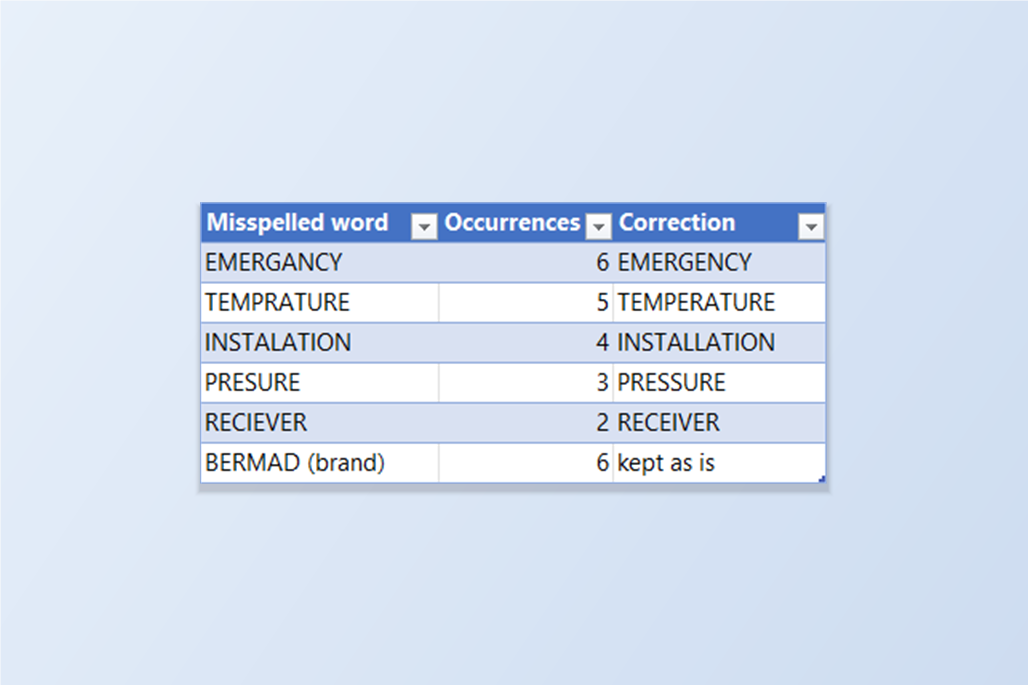
The result is a list of misspelled words, each with its number of occurrences and a suggested correction. Here the six drawings gave nine misspelled words in 29 occurrences.
2. See where each word occurs
Expand a word to see every place it occurs, grouped by drawing, with the layer and the surrounding text so you can judge it in context. TEMPRATURE appears five times, in five different drawings; one of them sits in a note that also has Chinese characters, and only the English word is flagged.
This is the point of grouping by word: a note copied into a dozen drawings is a dozen occurrences but one row, so the whole review comes down to the number of different mistakes, not the number of places they were typed.
3. Decide once per word
For each word pick a suggestion from the drop-down or type your own correction. The replacement keeps the case of the original — a word in capitals is corrected in capitals. NaCLO becomes NaClO, because a miscased chemical formula is offered as the first suggestion.
Some words aren't mistakes. BERMAD is a manufacturer's name, DATASHEET and HYDROSTATIC are real terms this dictionary doesn't include. Ignore leaves a word alone for this run; Add to Dictionary stores it so it is never flagged again, in a dictionary shared by TextSync and BlockSync. Ignore All marks every undecided word as ignored, when you want to un-ignore just the few you'll fix.
Apply Top Suggestion to All fills in the first suggestion for every word you haven't decided, which is quick for a list of plain typos. It never writes anything by itself: the corrections stay in the list until you write them.
4. Write the corrections and check again
Click Write Corrections to DWG. A confirmation says how many files and how many text objects are about to change and where the backup goes — here 6 files and 21 objects. Confirm, and each drawing is backed up and then corrected in place; MText keeps its formatting. Restore Backup… puts drawings back from any run's backup.
Run Check Spelling once more to see what is left. Only the three ignored words remain — BERMAD, DATASHEET and HYDROSTATIC — with their eight occurrences.
Know the limit of a spell checker: it can only tell that a word is not in the dictionary. It can't tell that a real word is the wrong one. "PRESSURE REDUCING VALUE" passes, although VALVE was meant, because VALUE is a perfectly good English word; the same drawing set can still hold mistakes like that, and only a person reading the notes will find them.
TextSync checks DBText and MText. Attribute values in title blocks and tags are covered by the Spell Check mode in BlockSync, which uses the same filters and the same dictionary. The filters, and the abbreviations and technical words they skip, can be adjusted in Settings. For a full walkthrough of every screen and setting, see the TextSync docs. To try it on your own drawings, download TextSync — the Free tier covers up to 10 drawings per batch.