
 Dwg2Pdf V2New
Meet Dwg2Pdf V2: faster and more flexible
Dwg2Pdf V2 convert DWG to PDF directly, without AutoCAD.
Windows · Most tools need no AutoCAD · Free to start
Dwg2Pdf V2NewDwg2Pdf V2 convert DWG to PDF directly, without AutoCAD.
 DwgSearch V2New
Turn your whole drawing library into something you can search, then jump to the exact spot in DWG Viewer. No AutoCAD required.
 BlockCompare V2New
Two revisions, thousands of blocks. BlockCompare lists every one that moved, switched layer or got a new attribute value, down to the field. It runs on any Windows PC, no AutoCAD required.
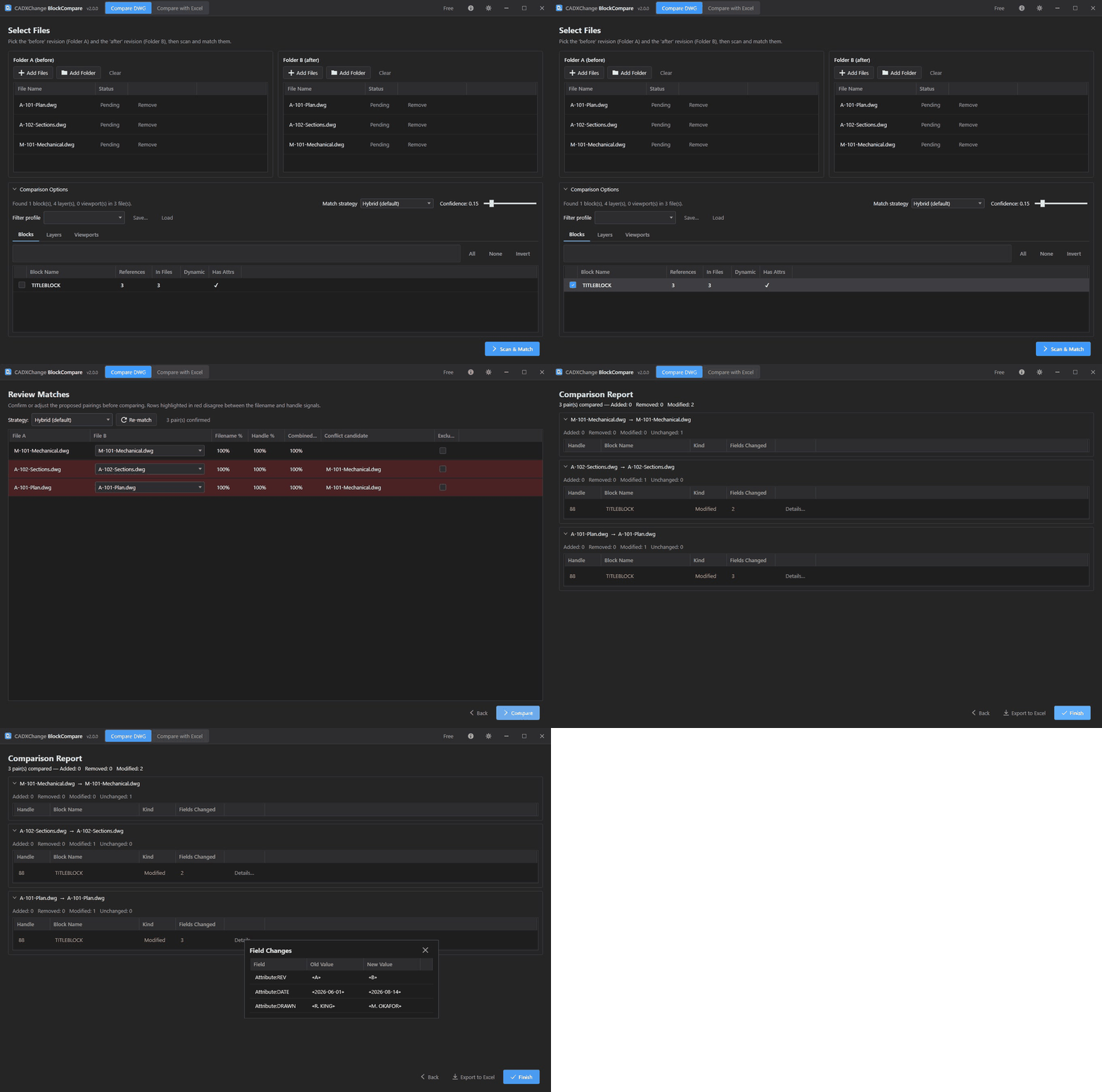
 TextCompare V2New
Two revisions, hundreds of notes. TextCompare lists every one that was reworded, moved, resized or added, with the old text next to the new. It runs on any Windows PC, no AutoCAD required.
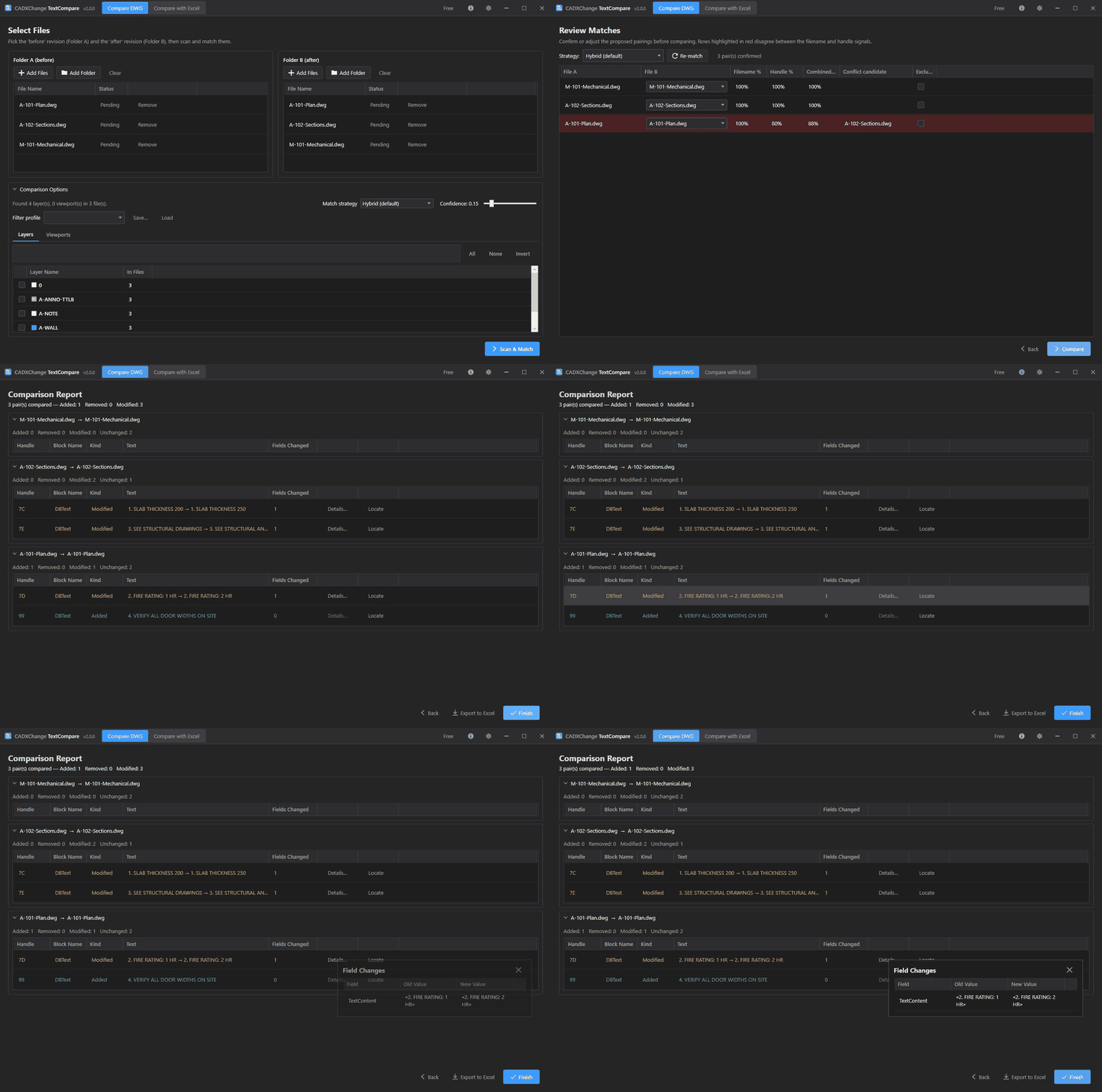
 BlockSync V2New
BlockSync pulls every block attribute out into Excel. Edit it like a spreadsheet, preview, write it back. No AutoCAD needed.
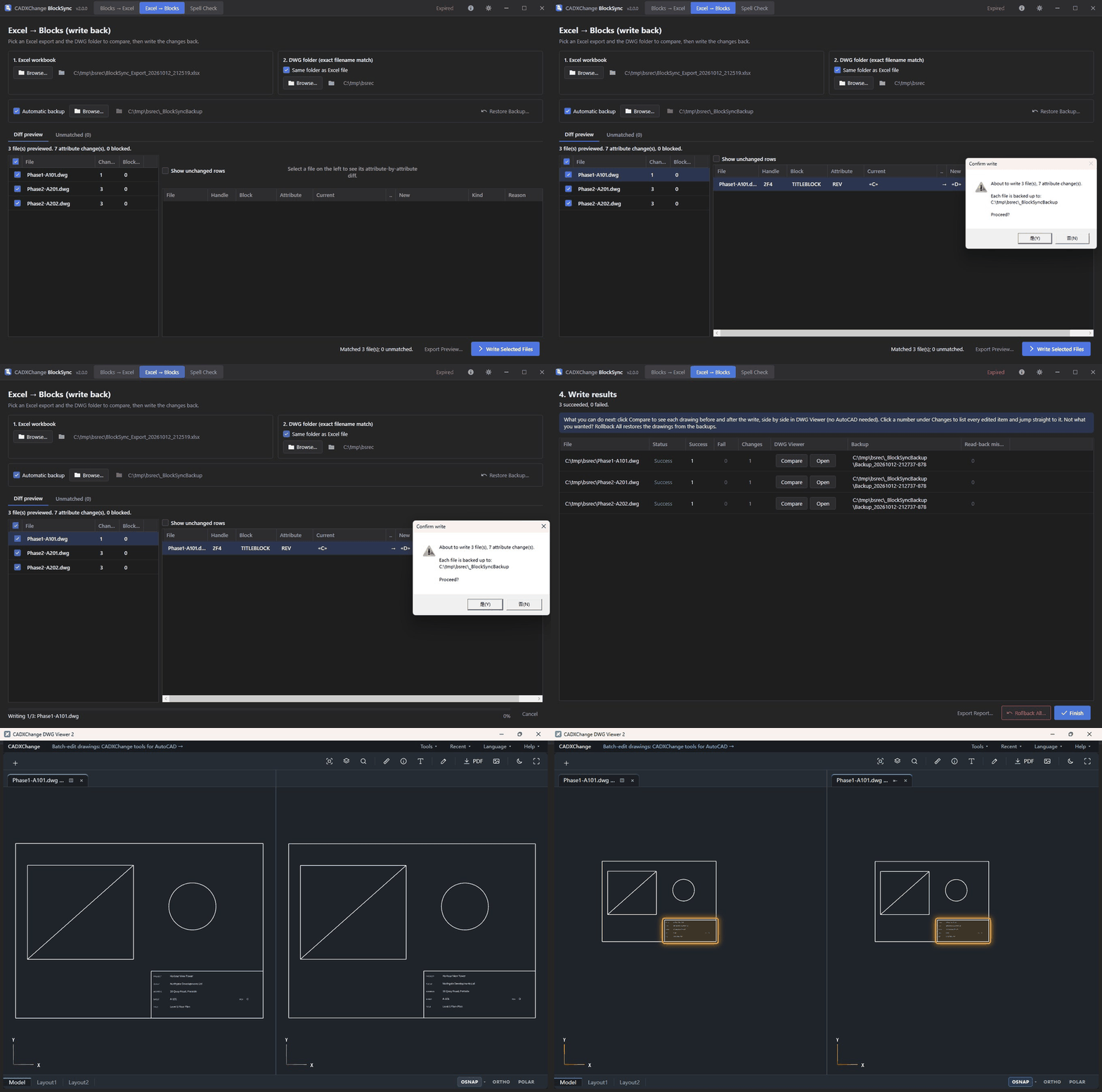
 TextSync V2New
TextSync pulls every note and label out into Excel. Translate or correct it there, preview what changes, write it back. No AutoCAD needed.
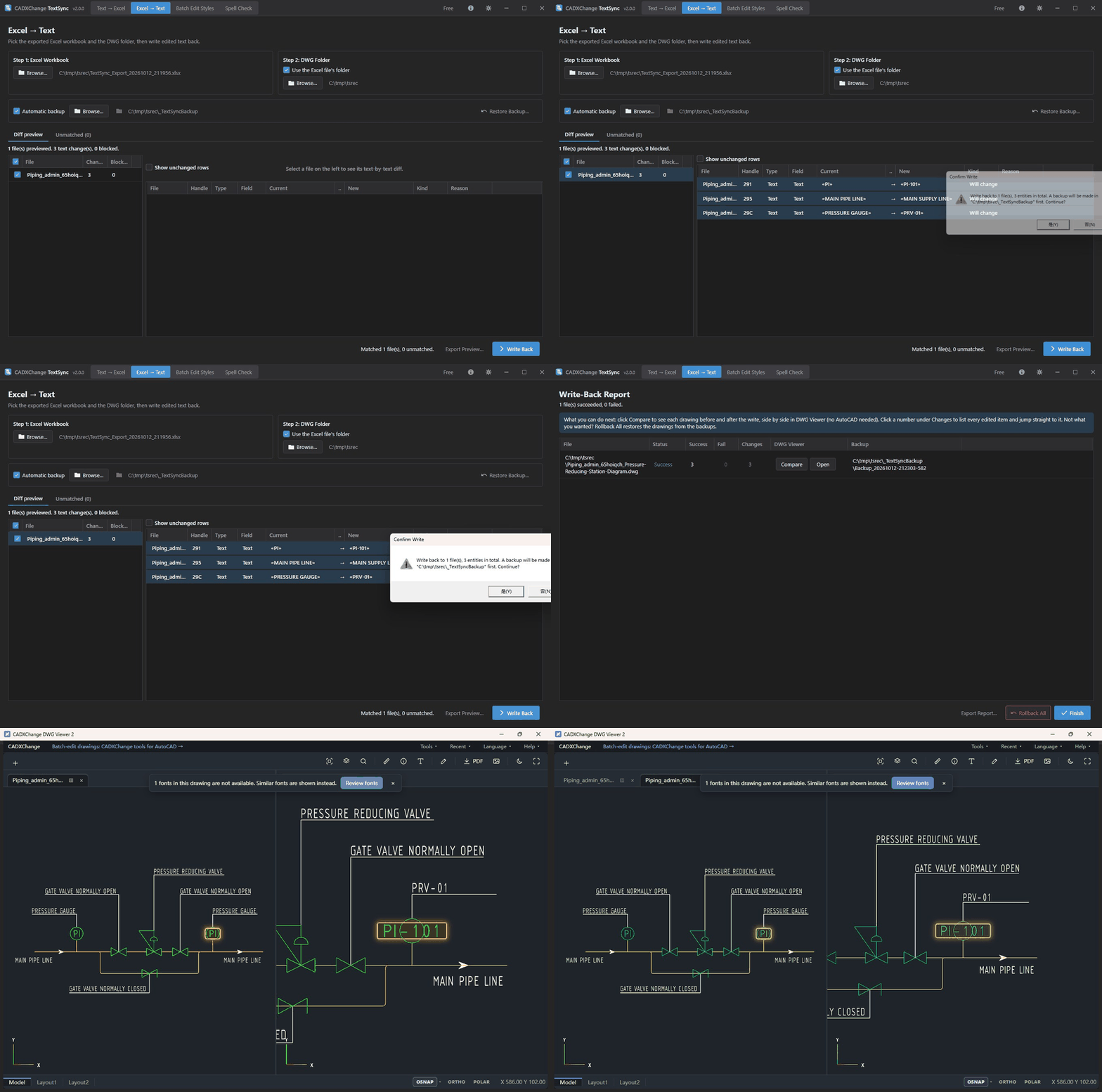
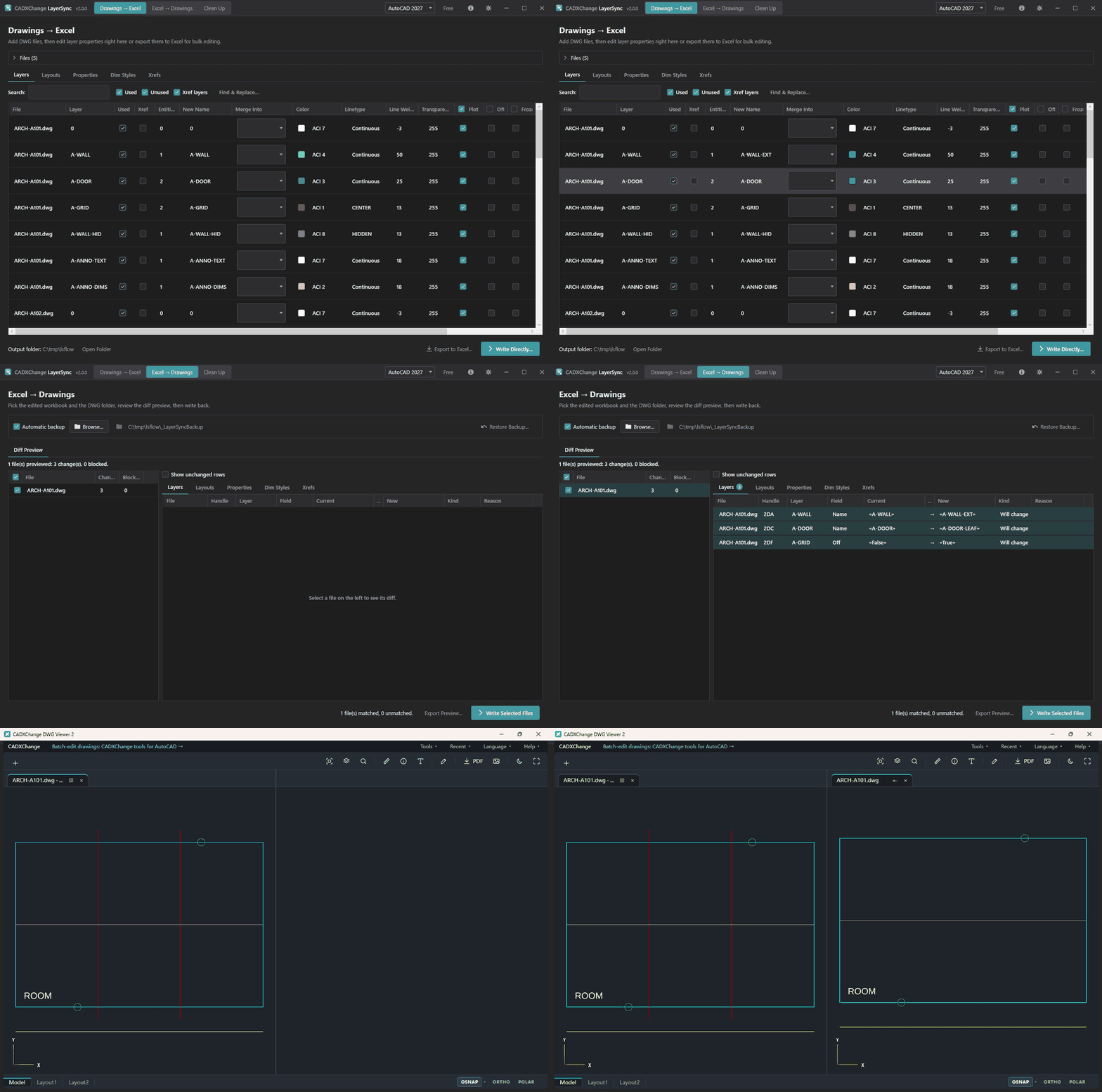
 LayerSync V2New
LayerSync reads every layer, layout, drawing property and dimension style into Excel or a grid. Change them, preview, write back. No AutoCAD needed.
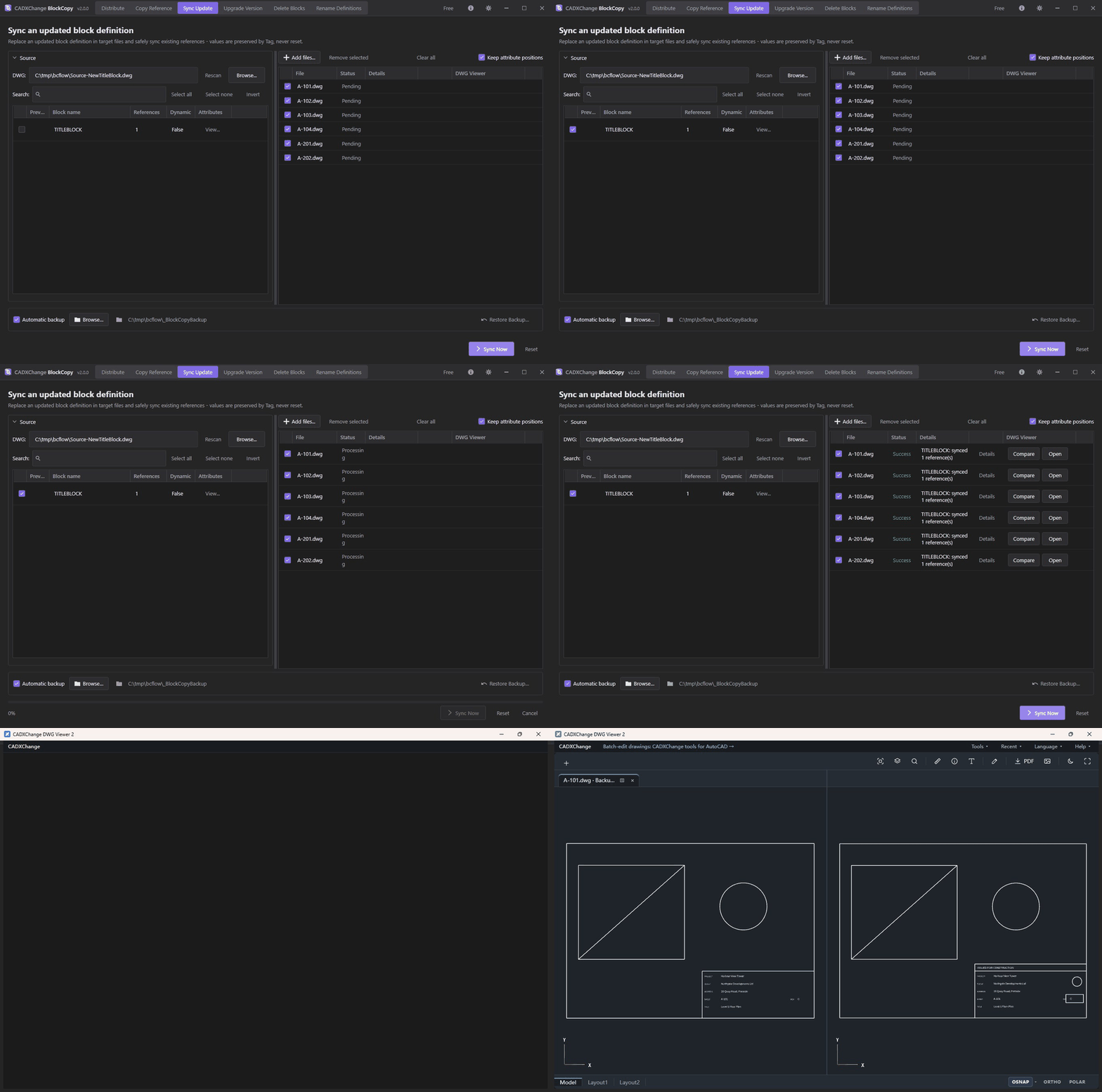
 BlockCopy V2New
BlockCopy copies, syncs, upgrades and deletes blocks across whole sets of drawings, and every filled-in attribute value stays exactly as it was. No AutoCAD needed.
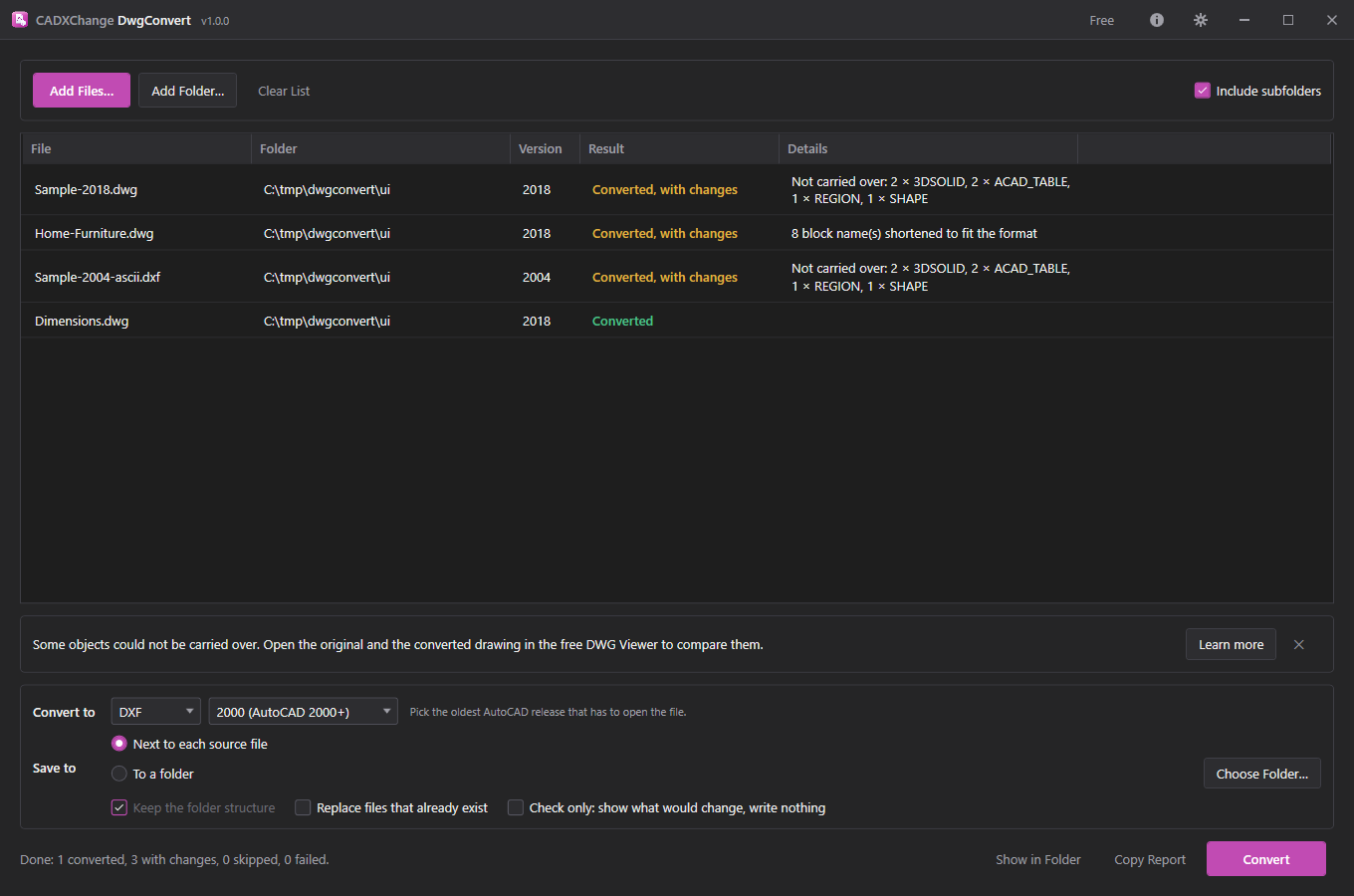
 DwgConvert V2New
Drop in a folder, pick DWG or DXF and the oldest AutoCAD release that has to open the result, and every drawing is converted. A report lists anything that could not be carried over. Free, unlimited, and nothing leaves your PC.
 P3DSync V2New
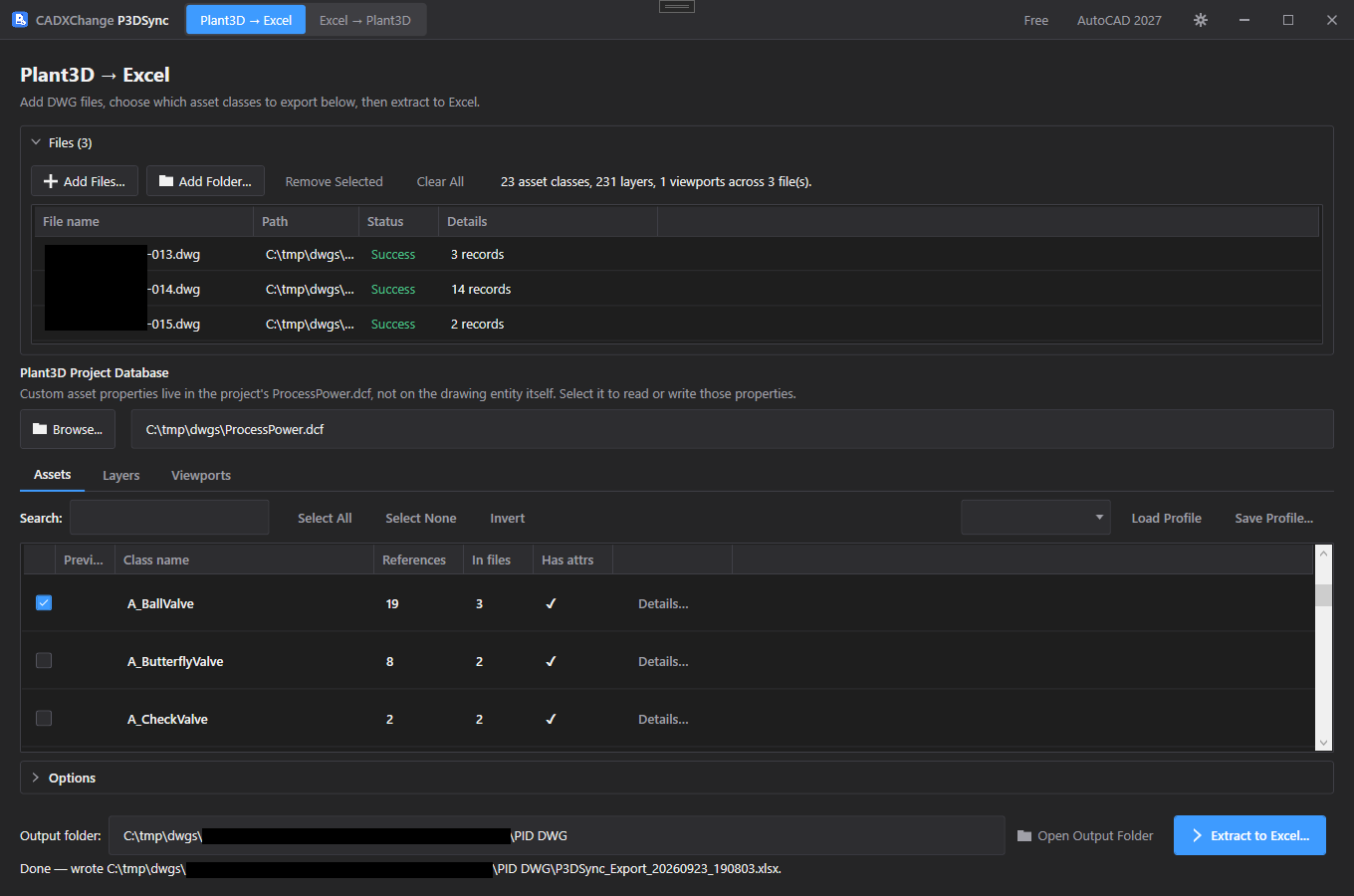
Add a folder of drawings and P3DSync lists every asset class with its Tag and UDA attributes. Export to Excel, edit, preview exactly what will change, then write back with an automatic backup and a read-back check. Plant3D does not have to be installed, and your drawing files are never modified.
Open the one that sounds like yours. You'll see how it gets done and how long it takes.
Don't see yours?
Shown with BlockSync. No AutoCAD to open, no drawing-by-drawing.
Point it at a folder or choose the files. You don't open any of them.
Every value comes out as a table row. Fill down, find and replace, sort: the Excel moves you already know.
See each change before it happens. A backup is made first, and one click undoes it.
Both routes end with the same drawings. The difference is how much of your working day the job takes — and how many chances there are to mistype a value along the way.
By hand
6 h 52 min
about 2.06 min per drawing
With CADXChange
25 min
about 0.12 min per drawing
Average of the ten example jobs below, for an experienced user. Change the number and see your own.
The AutoCAD way
Open each drawing → EATTEDIT the title block → retype the values → save → close. ATTOUT/ATTIN and GATTE still work one drawing at a time; DATAEXTRACTION can't write back.
With BlockSync
Export all 200 title blocks to one Excel sheet → fill down → preview the diff → write back.
Values typed once, not 200 times — far fewer typos to catch later.
See how it works →The AutoCAD way
Open each sheet → INSERT the new definition to redefine it → ATTSYNC → retype any values it reset → save → close.
With BlockCopy
Pick the source drawing and the target folder → dry-run preview → Sync Update. Every filled-in value is kept, matched by tag.
No lost attribute values to discover after the drawings have gone out.
See how it works →The AutoCAD way
Open each drawing → FIND and replace the old wording → check the font in STYLE → save → close. Then again for every variation of the note.
With TextSync
Export every DBText and MText to Excel → replace or translate there → map old text styles to new → write back.
Every variation of the wording sits side by side in one sheet.
See how it works →The AutoCAD way
Check PAGESETUP and the CTB on every layout → build a PUBLISH sheet list → plot → merge and reorder the PDFs in another program.
With Dwg2Pdf
Add the folder → pick and order layouts → choose one CTB or color policy and how PDFs merge → plot.
The same setup is reused for the next issue — no rebuilding .dsd files.
See how it works →The AutoCAD way
DWGCOMPARE each pair of drawings → scan the overlay → click into blocks to read attribute values → note the differences by hand.
With BlockCompare
Point it at the old folder and the new one → every changed block and field in one report → export to Excel.
A complete list, not a spot check — changes missing from the revision notes stand out.
See how it works →The AutoCAD way
DWGCOMPARE sheet by sheet, or re-read every note against the comment log.
With TextCompare
Compare the before and after folders → every changed note listed with its old and new text.
Free — no license needed.
See how it works →The AutoCAD way
Guess which drawings might contain it → open them one by one → FIND → close. Windows Search can't see inside a DWG.
With DwgSearch
Type the tag → every drawing, layout and block that contains it, in seconds → one-click Locate in AutoCAD.
Free — and nothing gets missed because you guessed the wrong drawing.
See how it works →The AutoCAD way
Open each drawing → SAVEAS → pick the 2010 format → save into a new folder → repeat 60 times.
With DwgConvert
Add the project folder → choose DWG 2010 → convert. The folder structure is kept.
Free — and the report shows anything that did not carry over.
See how it works →The AutoCAD way
Edit Tags and UDA values in Data Manager asset by asset, then check every drawing that references them.
With P3DSync
Export every Tag and UDA to Excel → apply the old-to-new mapping with a lookup formula → preview → write back.
The diff preview lists every Tag change before anything is committed.
See how it works →The AutoCAD way
Open each drawing → rename and merge layers one by one (RENAME, LAYMRG) → fix layer colors → edit DWGPROPS → UPDATEFIELD → save → next.
With LayerSync
Read every layer and property into one grid or workbook → rename, merge, recolor and set the revision in bulk → preview → write back.
The diff preview lists every layer and property change before anything is written, and a backup is taken first.
See how it works →Estimates for an experienced user, taken from the example scenarios on each product page. Actual times depend on drawing size, hardware and file count.
A dry-run preview lists what will change, file by file and value by value, before anything is written.
A backup is made before writing and checked after. Changed your mind? One click brings everything back. Cancel mid-run and finished files are kept.
No upload, no cloud processing. The internet is only used to check your license.
Plotting, searching, comparing and editing title blocks and text work without AutoCAD installed. The other tools need full AutoCAD 2021–2027 (not LT). System requirements
Export block attributes to Excel, edit, and write them back safely. No AutoCAD needed.
Bulk-edit title blocks and attributes, or export a purchase list
Push an updated block definition into hundreds of drawings without losing attribute values. No AutoCAD needed.
Replace old title blocks and symbols across all drawings
Batch-edit text across drawings — MText, DBText, plus text styles. No AutoCAD needed.
Translate or replace the text on every drawing
Batch-plot DWG layouts to PDF without AutoCAD, with merging, color policy and CTB.
Turn a whole batch of layouts into PDFs
Compare block definitions and attributes between two drawing revisions, field by field. No AutoCAD needed.
See which blocks changed between two revisions
Compare text (DBText and MText) between two drawing revisions, entry by entry. No AutoCAD needed.
See which notes changed between two revisions
Search every DWG in a folder tree, then land on the hit in DWG Viewer. No AutoCAD needed.
Search inside a whole batch of drawings without opening them
Convert DWG and DXF drawings in bulk, to any AutoCAD version. Free, unlimited, no AutoCAD needed.
Convert drawings between DWG and DXF, or to an older AutoCAD version
Export Plant3D asset Tags and UDA attributes to Excel, edit, and write them back safely. No Plant3D or AutoCAD needed.
Bulk-edit Plant 3D tags and properties
Batch-edit layers, layouts, drawing properties and dimension styles across a whole drawing set — in Excel or right in the grid, with a diff preview first. No AutoCAD needed.
Bring layers and title block revisions to your company standard
Each of these works one drawing at a time
They're great for one drawing at a time. Here's where each one runs out of road — and which tool picks up from there.
ATTOUTATTIN· Express ToolsIn AutoCAD
Exports and re-imports attributes one drawing at a time, through a tab-delimited text file.
DATAEXTRACTIONEATTEXTIn AutoCAD
Pulls attribute data out to a table or spreadsheet — but can't write edited values back into the drawings.
EATTEDITATTEDIT-ATTEDITIn AutoCAD
Edits one block reference at a time, in the drawing you have open.
GATTE· Express ToolsIn AutoCAD
Sets one tag to the same value on every instance — in the current drawing only.
ATTSYNCIn AutoCAD
Re-syncs references to the block definition one drawing at a time — and can reset filled-in attribute values.
BEDITBSAVEINSERTIn AutoCAD
Change a block once — then redefine it again in every other drawing that uses it, one file at a time.
BLOCKREPLACE· Express ToolsIn AutoCAD
Swaps one block for another in the current drawing only.
ADCENTERTOOLPALETTESIn AutoCAD
Drag a block into drawings one at a time.
QSELECTERASEPURGEIn AutoCAD
Removing a block everywhere means select, erase and purge — drawing by drawing.
FINDIn AutoCAD
Find and Replace works inside the drawing you have open.
TEXTEDITDDEDITMTEDITIn AutoCAD
One text object at a time.
STYLEIn AutoCAD
Changes a text style's font in one drawing.
PUBLISHIn AutoCAD
Page setups, sheet lists and .dsd files — slow to set up and easy to get wrong.
PLOTEXPORTPDFIn AutoCAD
One layout at a time.
PAGESETUPIn AutoCAD
The right CTB has to be attached to every layout by hand before a submission run.
COMPAREDWGCOMPAREIn AutoCAD
Compares two drawings at a time as a visual overlay — no list of which attribute values or block properties changed.
COMPAREDWGCOMPAREIn AutoCAD
Highlights that geometry moved — but won't list the old and new wording of every note that changed.
FINDIn AutoCAD
Searches the drawing you have open — nothing else.
ADCENTERIn AutoCAD
DesignCenter's search can find drawings by block name, but not by the text or attribute values inside them.
Windows SearchIn AutoCAD
Can't see inside a DWG file at all.
Data Manager· Plant 3DIn AutoCAD
Views asset properties, but bulk-editing Tag and UDA values across many drawings is still manual work.
LAYTRANSIn AutoCAD
Maps one drawing's layers onto a standard at a time, and has no command-line version — so it can't be scripted across a batch.
DWGPROPSUPDATEFIELDIn AutoCAD
Edits the properties of the open drawing only, and title-block fields still need UPDATEFIELD afterwards.
DIMSTYLEIn AutoCAD
Changes a style in the open drawing — matching text height and arrows across a set means repeating it drawing by drawing.
PURGEIn AutoCAD
Works on the open drawing, and often needs several passes before nothing more comes out.
SCRIPTScriptProLISPWrite and debug a script, then run it blind — no preview, no automatic backup, no rollback.
→ Every CADXChange tool shows a preview of what will change, backs up first and can roll back — no scripting needed.
Every tool has a free edition with no time limit. Pro is licensed per tool, so you only ever pay for the ones you actually use.
Every paid tool has a free edition too: up to 10 drawings per batch, for as long as you like.
Start with a free tool
Compare text (DBText and MText) between two drawing revisions, entry by entry. No AutoCAD needed.
Search every DWG in a folder tree, then land on the hit in DWG Viewer. No AutoCAD needed.
Convert DWG and DXF drawings in bulk, to any AutoCAD version. Free, unlimited, no AutoCAD needed.