
Symbol palette for AutoCADFree Architectural plan Pro symbol library
CADXChange Symbols for AutoCAD: Architectural Plans Pro
All 633 architectural plan symbols one click away, at real size, with tags and attributes handled for you.
- 633 symbols
- Sheet frame, parts list, drawing check
- Free trial, every feature open
- Search in your own language
- 9 interface languages
- AutoCAD 2021–2027
- One-time purchase, no subscription
- 30 symbols free forever
About this download
- Publisher: CADXChange · cadxchange.net
- File: CADXChange-ArchitecturalProSymbols-1.15.3-x64-setup.exe · 6.3 MB
- AutoCAD: 2021-2027
- SHA-256:
4c1f5ddb1a38ebd570829756b37744954baf88487ca4ff60d6df2eb40bcb00b6 - By default, setup installs for your own Windows account and does not need administrator rights. You can remove it later in Settings, Apps.
Verify the download
To check the file, run one of these where you saved it. The result must match the SHA-256 above.
Get-FileHash .\CADXChange-ArchitecturalProSymbols-1.15.3-x64-setup.exe -Algorithm SHA256
certutil -hashfile CADXChange-ArchitecturalProSymbols-1.15.3-x64-setup.exe SHA256
The installer is not code-signed yet, so Windows may show “Windows protected your PC”. If the SHA-256 matches, choose More info, then Run anyway.
Choose your edition
one payment, no subscription
300 symbols from the core of the library, with the everyday drawing tools.
See Standard · $39one payment, no subscription
All 633 symbols, 333 more than Standard, with every Pro tool.
Buy · $59Try everything free for 14 days first. The 30 free symbols keep working afterwards.
Students and teachers
Use this Pro palette for study and teaching at half price ($29.50) for a year. All you need is a school e-mail address. The standard palette is free for schools.
How it works- Basis
- Architectural plan Pro
- Symbols
- 633, of which 30 free
- AutoCAD
- 2021-2027
- Languages
- English简体中文繁體中文日本語한국어DeutschFrançaisItalianoEspañol
- Licence
- Perpetual, one payment
No credit card needed. The 30 free symbols keep working after the trial. · Version 1.15.3 · Windows 10/11, 64-bit
About the palette
The palette is for the moment you start drawing: you are drawing a floor plan with hundreds of doors, windows, fixtures and pieces of furniture, and every one means opening a file, inserting a block, setting the size and numbering it by hand. The palette puts all 633 symbols in a panel next to your drawing, finds them by name in your own language, and places each one at its real size in millimetres, with its tag and attributes, in a single click. Five symbols work for free, so you can draw a real room before you decide.
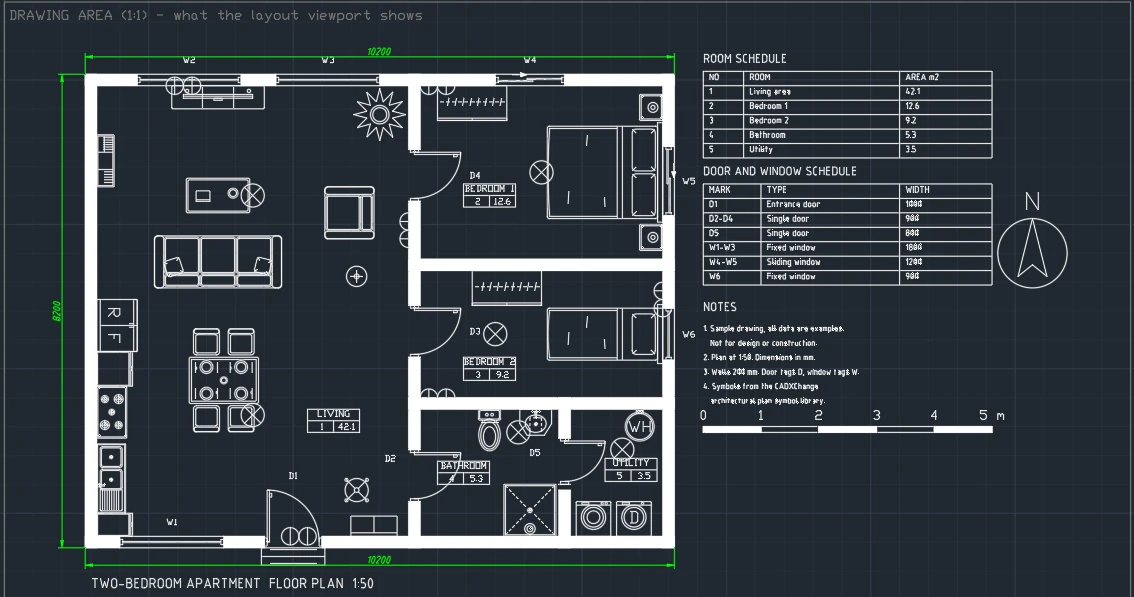 See this sample drawing →
What this palette can do
Click, place, repeat
Pick a symbol and it follows your cursor. Click to place it, and keep clicking to place more. Doors, windows and furniture keep their real size in millimetres whatever the drawing scale, so a 900 door is 900. The tag counts up by itself: D1, D2, D3.
Try it freeAttributes that carry over
Fill in the attributes once, for example the door type and the fire rating. The next symbols you place arrive with them, and the tag keeps counting. You type what changes, not everything again.
Try it freeSearch in your own language
Type a part of a name in English, Chinese, German or any of the nine languages and the palette shows the matching symbols from every group. No need to know which group a symbol is in.
Try it freeNine languages
English, Simplified and Traditional Chinese, Japanese, Korean, German, French, Italian and Spanish. The palette follows the language of AutoCAD, or you pick one in the palette; the symbol names change with it.
Try it freePlace a door in a wall
Pick a door, move it onto a wall and click: the door sits in the wall.
Push a wall section
Pick a wall section and move it: the walls joined to it follow, so rooms keep closed.
Recent and favourites
The symbols you used last sit at the top, and the ones you star stay there. After a day of drawing, the twenty symbols you use are always at hand.
What is inside
These are the 633 symbols the palette holds, shown as one sheet. You can see what you can place before you install anything. Click the sheet to enlarge it.
- Doors 30
- Windows 28
- Stairs, ramps and lifts 15
- Sanitary fixtures 41
- Kitchen and laundry 37
- Living and dining furniture 25
- Bedroom and office furniture 29
- Site and landscape 19
- Structure 15
- Drawing marks and tags 16
- Electrical and lighting 28
- Fire safety and emergency 27
- Accessibility and signage 17
- More furniture and fittings 21
- Door and window elevations 30
- Walls and partitions 16
- Roof plan 17
- Building services 19
- Everyday items and accessories 27
- School, shop and hospitality 29
- Healthcare, fitness and leisure 15
- Stair and railing details 13
- Sanitary fixtures, elevation 25
- Kitchen, elevation 20
- Floor tiles and paving 23
- Wall finishes and cladding 12
- Wallpaper and decorative patterns 13
- Materials in section 18
- Drawing marks and tags, more 8
30 symbols free, 633 with a key
30 symbols, picked from every part of the library, work in the palette without a key, with placement, attributes and search. That is enough to try the whole way of working. The other symbols are visible with a lock, and after the 14-day trial so are the drawing tools; click one and the palette tells you how to unlock it. The drawing you make is a normal DWG that opens everywhere, with or without the palette.
What is free, and what a licence adds
Install it and try everything for free. After the trial the free symbols stay; a licence keeps every symbol and tool below open.
| Free | Standard | ProPro | |
|---|---|---|---|
| Symbols | |||
| Symbols | 30 | 300 | 633 |
| What is in them | A starter set of the most used symbols | Doors 30Windows 28Stairs, ramps and lifts 15Sanitary fixtures 41Kitchen and laundry 37Living and dining furniture 25Bedroom and office furniture 29Site and landscape 19Structure 15Drawing marks and tags 16Electrical and lighting 28Fire safety and emergency 27Accessibility and signage 17More furniture and fittings 21Door and window elevations 30Walls and partitions 16Roof plan 17Building services 19Everyday items and accessories 27School, shop and hospitality 29Healthcare, fitness and leisure 15Stair and railing details 13Sanitary fixtures, elevation 25Kitchen, elevation 20Floor tiles and paving 23Wall finishes and cladding 12Wallpaper and decorative patterns 13Materials in section 18Drawing marks and tags, more 8 | Everything in Standard, plusMore symbols in the same groups |
| Placing and finding | |||
| Click, place, repeatPick a symbol and it follows your cursor. Click to place it, and keep clicking to place more. Doors, windows and furniture keep their real size in millimetres whatever the drawing scale, so a 900 door is 900. The tag counts up by itself: D1, D2, D3. | ✓ | ✓ | ✓ |
| Attributes that carry overFill in the attributes once, for example the door type and the fire rating. The next symbols you place arrive with them, and the tag keeps counting. You type what changes, not everything again. | ✓ | ✓ | ✓ |
| Search in your own languageType a part of a name in English, Chinese, German or any of the nine languages and the palette shows the matching symbols from every group. No need to know which group a symbol is in. | ✓ | ✓ | ✓ |
| Nine languagesEnglish, Simplified and Traditional Chinese, Japanese, Korean, German, French, Italian and Spanish. The palette follows the language of AutoCAD, or you pick one in the palette; the symbol names change with it. | ✓ | ✓ | ✓ |
| Recent and favouritesThe symbols you used last sit at the top, and the ones you star stay there. After a day of drawing, the twenty symbols you use are always at hand. | ✓ | ✓ | ✓ |
| Drawing tools | |||
| Sheet frame and title blockChoose ISO, ANSI, ARCH or GB, the paper size and a title: the frame, the title block and a print-ready layout are made at once. | During the trial | ✓ | ✓ |
| Parts listCounts every symbol by type, with its tags, and exports the list as a CSV file. | During the trial | ✓ | ✓ |
| Check drawingFinds duplicate tags and coils without contacts, lists each problem on its own line and selects the symbols involved. | During the trial | ✓ | ✓ |
| Replace a symbolSwap selected symbols for another one from the palette; position, rotation and tag are kept. | During the trial | ✓ | ✓ |
| More | |||
| Updates of this palette; no subscription | ✓ | ✓ | ✓ |
| Students and teachers | — | Free for a year | Half price for a year |
| Try free | Try Pro free | ||
Keep it after the trial
One payment, no subscription. Students and teachers can get it free or at half price; see below.
Symbol palette licence
$39
For one person, on two computers
- Pay once
- 2 computers
Student or teacher?
Free for one year with your school e-mail address. Renew it with the same address.
Sign in with your school e-mail address, we check it, and the licence is added to your account.
Available soonEducation licences are for study and teaching, valid for one year, and renewed with your school e-mail address.
Symbol palette licence
$59
For one person, on two computers
- Pay once
- 2 computers
Student or teacher?
Half price ($29.50) for one year with your school e-mail address. Buy again next year to renew.
Sign in with your school e-mail address, we check it, and you pay half price.
Available soonEducation licences are for study and teaching, valid for one year, and renewed with your school e-mail address.
What you get
- All 633 symbols unlocked (the 30 free ones always work)
- Sheet frame, parts list and drawing check
- Search, tags, attribute carry-over, favourites and recent symbols
- The palette in nine languages
- Updates of this palette; no subscription
- Try every symbol and tool free first; the 30 free symbols always work.
- The DWG libraries stay free: you pay for the palette, not the symbols.
- Refund within 14 days if the key is not activated.
- New computer? Free the old one in your account and activate again.
What you need
- Windows 10 or 11, 64-bit.
- AutoCAD 2021 to 2027 (the full program; AutoCAD LT is not supported).
- An internet connection to activate the key. Afterwards the palette keeps working offline for up to 14 days between checks.
- Your drawings stay on your computer. The palette never sends anything from them.
Students and teachers
Use this Pro palette for study and teaching at half price ($29.50) for a year. All you need is a school e-mail address. The standard palette is free for schools.
1
Sign in with your school e-mail
Continue with Google or get a sign-in link by e-mail. The address of your account must be a school address, such as name@university.edu or name@college.ac.uk.
2
We recognise the school
The school is recognised from the address. There is no form to fill in and no student card to upload.
3
Pay half price
You go to the checkout at the education price, then the licence key appears in your account.
Good to know
- For study, teaching and research. Commercial projects and work for clients need a regular licence.
- Valid for one year. To renew, buy again at the education price with the same school e-mail address.
- Gmail, Outlook and other private addresses do not qualify. If your school address is not recognised, the price card shows a form where you tell us your school, and we add it.
Questions
- What is free and what do I pay for?
- 30 symbols work in the palette without a key; the key unlocks all 633. You pay for the palette: browsing, search in nine languages, placing with attributes, carry-over and favourites. The DWG library on this website is a separate product: single symbols and a starter pack are free, the whole library is its own licence.
- Can I try it before I buy?
- Yes, in two ways. The 30 free symbols work for good with every feature: placement, tags, attributes, search. On top of that, every symbol and tool is open for 14 days from the first time you start the palette, Pro features included. After that only the free symbols stay open, until you add a key.
- On how many computers does a key work, and does it need internet?
- An individual key works on two computers, an organisation key on as many as its people band. Internet is needed to activate. After that the palette checks the licence from time to time and keeps working for up to 14 days offline. To move to a new computer, free the old one in your account and activate again.
- Which AutoCAD versions and systems are supported?
- AutoCAD 2021 to 2027 on Windows 10 and 11, 64-bit. AutoCAD LT and Mac are not supported.
- Can I get a refund?
- Yes, within 14 days of the purchase as long as the key has not been activated. See the refund policy.
- Does it change my drawings? Will colleagues without the palette see them?
- The symbols are inserted as ordinary blocks with their attributes. Your drawing is a normal DWG that opens on any computer, with or without the palette. Nothing is locked inside it.
- I work for a company. Which licence do I need?
- Choose the Organisation licence and the number of people who will use it; the price on the card is for one company. For a quote or a purchase order write to support@cadxchange.net.
- I am a student or a teacher. How do I get the education offer?
- Sign in with your school e-mail address and use the education button on the price card. The standard palette is free for one year, and a Pro palette is half price for one year. The steps are in the Students and teachers section above.
- My school e-mail address is not recognised. What now?
- The price card then shows a form: enter your school name or website. We check it and add the school, and you can claim again afterwards. Private addresses such as Gmail or Outlook cannot be used.
Related
Draw faster from the first symbol
Install the free palette, try every symbol and tool, and keep the 30 free symbols afterwards. Unlock all 633 when it feels right.