
Power system secondary equipment symbols
Free DWG libraries for the secondary equipment of a power system: protection, control, measurement and communication. Pick a library on the left, or search for a symbol by name.
2 libraries
- New
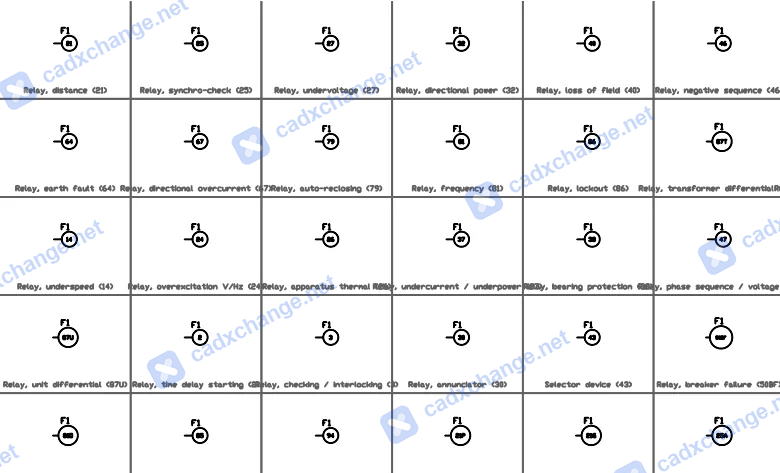 Symbol libraryIEC 60617 · 572 symbols
Power system secondary equipment symbols
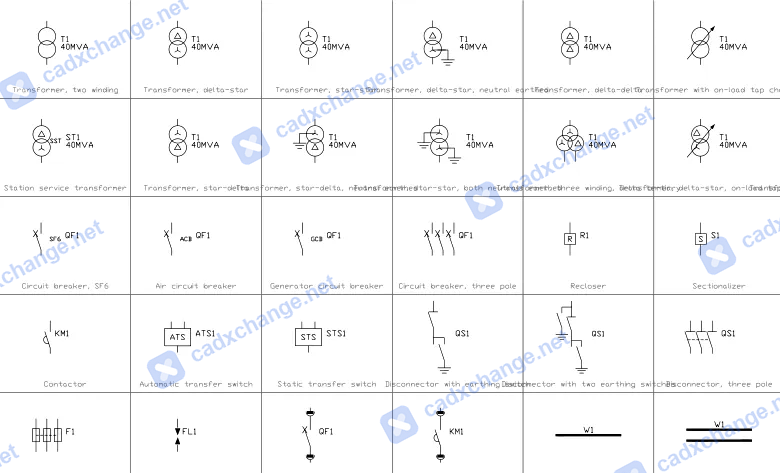 Symbol libraryIEC 60617 · 139 symbols93
Power system single-line symbols (IEC 60617)
- New
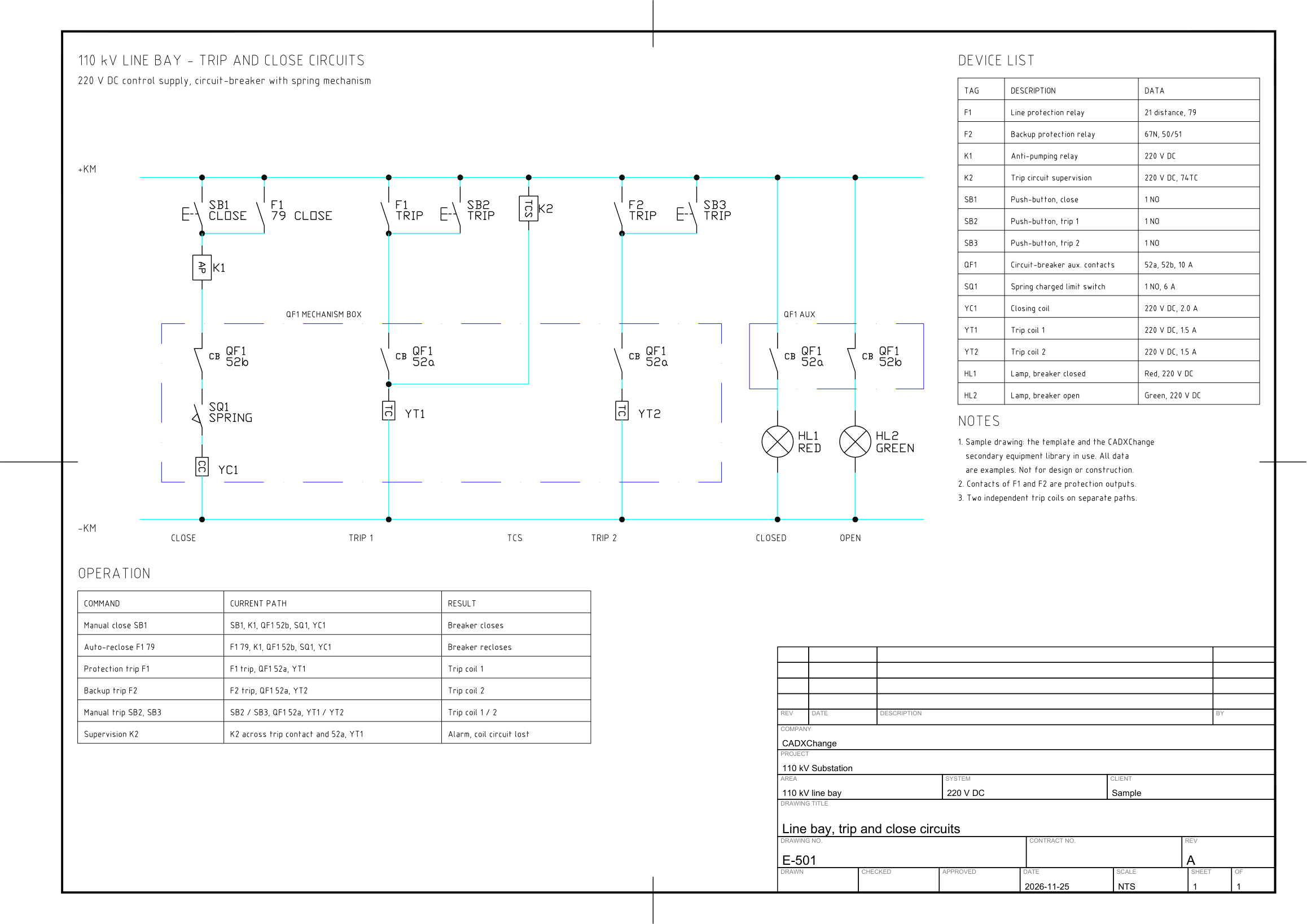 Sample drawing2 variants of this drawing, each with its own ZIP.
110 kV line bay secondary circuits
- New
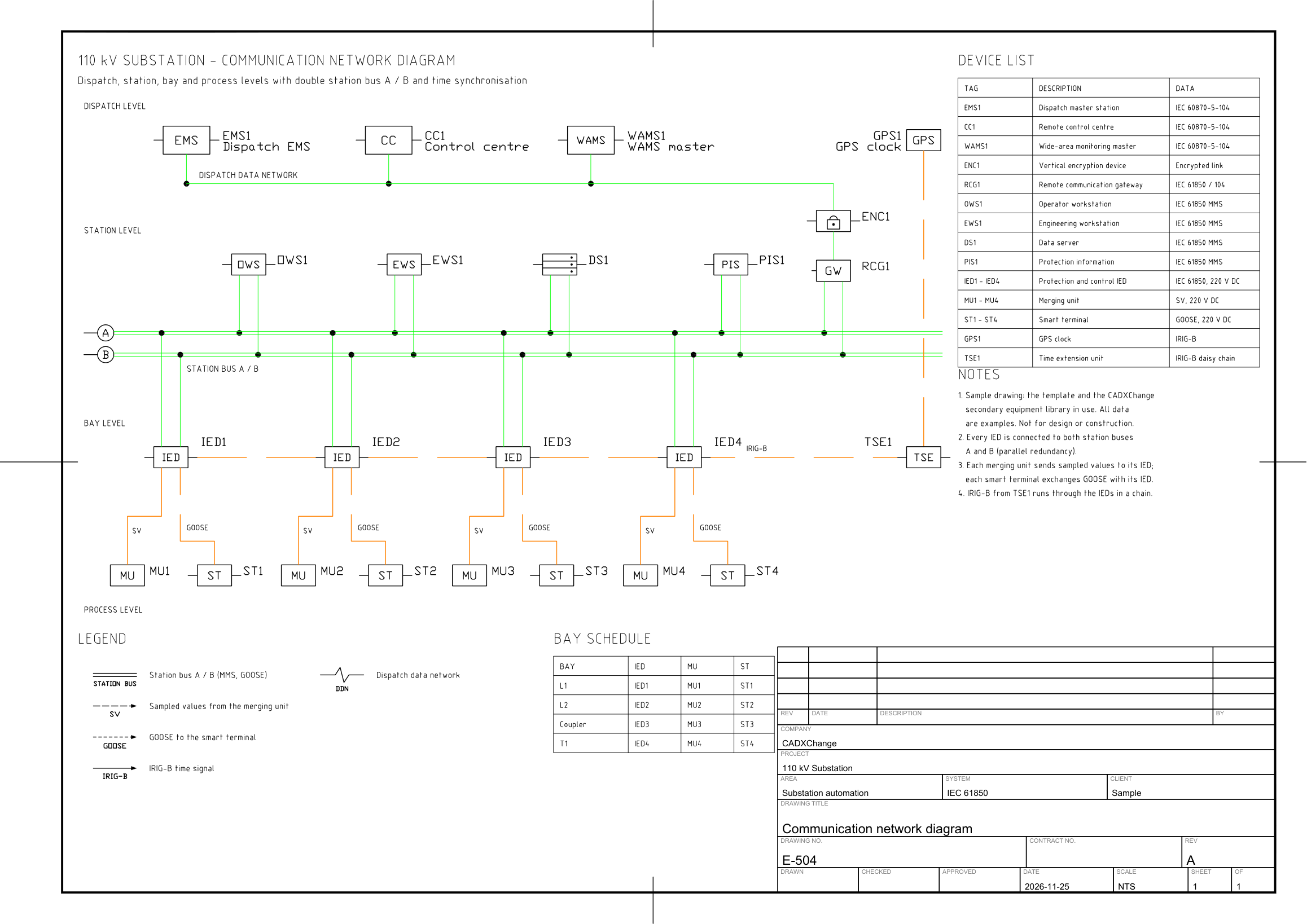 Sample drawing
Substation communication network diagram
Can’t find the library or template you need? Tell us what you are drawing.
Power system secondary equipment symbols: protection and control, and which library to take
What is secondary equipment?
Secondary equipment is everything that watches and operates the primary equipment: protection relays, control switches, trip and close circuits, instrument transformer secondary circuits and test terminals, meters, annunciators, DC supplies, and the communication and automation devices of a substation. It works at low voltage and low current, from signals taken from the current and voltage transformers.
Which library for which drawing?
Take the secondary equipment library for protection and control schematics: relays with their function numbers, trip and close circuits with supervision and anti-pumping, test blocks, meters and annunciators. For the primary side, such as breakers, transformers and busbars, use the primary equipment page; the power system single-line library covers both for a single-line diagram that shows the relays.
Drawings made with these libraries
Three sample drawings show the symbols in use: the DC trip and close circuits of a 110 kV line bay, the control circuit schematic of the same bay with local and remote disconnector control, interlocks and SF6 alarm, and the communication network diagram of a 110 kV substation with station bus, process level and time synchronisation. Download them with their electrical template and see how the blocks are placed and filled in.
How are the blocks built?
Every symbol is a ready-to-insert AutoCAD block with attributes for tags and schedules, such as relay settings, trip outputs and current or voltage inputs. Protection function numbers follow the common device-number practice, and the contact and coil symbols are our own drawings in the usual IEC 60617 forms.
Browse the libraries
By purpose
By industry
By standard
- ISO: ISO 10628-2, ISO 2338, ISO 464, ISO 2491, ISO metric, ISO 2553, ISO 4063, ISO 23601, ISO 1219-1, ISO 1101, ISO 15, ISO 7010, ISO 2162 / ISO 2203, ISO 7000 general equipment marks, ISO 7000 machine tool and CNC marks, ISO 7000 plastics, process and welding marks, ISO 7000 textile machinery marks, ISO 7000 vehicle, crane and earthmoving marks, ISO 3766, ISO 1302, ISO 13715, ISO 6412-2, ISO 14084-2, ISO 14617, ISO 3601
- IEC: Common electrical symbols (IEC 60617), IEC 61131-3, Power system single-line symbols (IEC 60617), Logic gate symbols (IEC 60617), Flip-flops, multiplexers, op amps (IEC 60617), IEC 60617-5, IEC 60617-9, IEC 60617-10, IEC 60617-2, -7, IEC 60617-2, -6, -8, IEC 60617-3, -11, Power system primary equipment symbols, Power system secondary equipment symbols, Equipment marks: power, earth, safety and controls, Audio, video and television marks, Telecom, radio, radar and data marks, Household appliance marks, Medical and imaging equipment marks, IEC 60617 database, Multiplexers, adders, decoders, counters (IEC 60617)
- ISA: ISA 5.1, ISA 5.5, ISA 5.3
- IEEE / ANSI: ANSI/IEEE 315
- ASME: ASME B16.5, ASME B16.9
- AWS: AWS A2.4
- EN / DIN: EN 10365, EN 10210-2, EN 1092-1, EN 60715
- AISC: AISC wide-flange and I-beam shapes, AISC channels and angles, AISC HSS and steel pipe
- MUTCD (US road signs): US regulatory road signs (MUTCD), US warning and work zone road signs (MUTCD)
- Vienna Convention (international road signs): Vienna Convention
- StVO (German road signs): Road signs (Germany, StVO)
- TSRGD (UK road signs): Road signs (UK, warning and works), Road signs (UK, regulatory and parking), Road signs (UK, direction and information)
- GB 5768 (Chinese road signs): Road signs (China, regulatory and warning), Road signs (China, guide and tourist)
- Industry practice: Architectural plan symbols, HVAC symbols, Drawing annotation symbols, Home furniture, Landscape plan symbols, Plumbing and fire protection symbols, Entourage symbols, Drawing marks, site, services and accessibility symbols, Stairs, walls, roofs and structure symbols, Furniture plan symbols, Scandinavian furniture plan symbols, Mediterranean and Spanish colonial furniture plan symbols, Classic furniture plan symbols, Japanese furniture and tatami plan symbols, Mid-century modern furniture plan symbols, Industrial and loft furniture plan symbols, Rustic and farmhouse furniture plan symbols, Coastal and boho furniture plan symbols, Art deco furniture plan symbols, Contemporary modular furniture plan symbols, Closet, pantry, laundry and mudroom symbols, Garage and workshop symbols, Septic tank and on-site wastewater, Stadium seating and stand layouts, Bar, pub and nightclub layouts, Game room and hobby room furniture, EV charging station layout, ADA 2010, Approved Document M, AS 1428.1, Taiwan interior design, Reflected ceiling plan, Civil site utility plan, Brewery, winery and distillery layout, RV, tiny house and yacht interior layout, Fuel station, car wash and auto service layout, Spa and wellness symbols, Greenhouse and hydroponics symbols, Church, mosque and temple layout symbols, Bathroom and kitchen symbols, Door and window symbols, Building electrical plan symbols, Metallurgy and rolling mill symbols, Water and wastewater treatment symbols, Process equipment symbols, Process equipment symbols (pictorial views), Solar PV and energy storage symbols, Wind power symbols, Event and venue layout symbols, Office layout symbols, Restaurant and retail layout symbols, Sports court and field symbols, Kitchen and bathroom cabinet symbols, Sports facility and equipment symbols, Farm and livestock layout symbols, School and classroom layout symbols, Laboratory layout symbols, Data center layout symbols, Playground layout symbols, Car park layout symbols, Cleanroom layout symbols, Pharma and biopharma process layout symbols, Laboratory apparatus and glassware symbols, Warehouse and logistics layout symbols, Factory and production line layout symbols, Construction site layout symbols, Control panel layout symbols, Hospital and healthcare layout symbols, Hotel and hospitality layout symbols, Airport layout symbols, Road and traffic layout symbols, Food, beverage and packaging plant symbols, Oil, gas and mining site symbols, Ship general arrangement symbols, Marine piping and systems symbols, Supermarket and convenience store layout symbols, Swimming pool, spa and outdoor living symbols, Salon, dental and veterinary clinic layout symbols, Gym and fitness studio layout symbols, University and library layout symbols, Music and stage layout symbols, Gallery and art studio layout symbols, Concrete wall and foundation section details, Building envelope section details, Cinema and theatre layout symbols, Bank, post office, pharmacy and laundrette layout symbols, Weather chart symbols, Geologic map symbols, Chemical structure drawing symbols, Refrigeration and mechanical room symbols, Network topology diagram symbols, Planting plan plant symbols, Railings, balustrades and handrails, Radiation protection and nuclear facility layout, NFPA 704
Questions about the free resources
- Are the DWG symbol libraries free?
- Yes. Every library on this page is a free download: one ZIP per DWG file, with a preview of every symbol before you download.
- How do I find a symbol quickly?
- Type its name ("gate valve"), a designation ("IPE 200", "DN100", "M8") or a block name into the search box. The Filters button next to it narrows the libraries by industry, purpose, standard and type, and the tabs under the box switch between symbol libraries, templates, sample drawings and LISP commands. The search works inside whatever the filters leave. Symbol names are in English.
- Which standards do the libraries follow?
- ISO, IEC, ISA, IEEE / ANSI, ASME, EN / DIN and AISC are covered, for example IEC 60617, ISA 5.1, ISO 10628-2, ISO 1219-1, ISO 1101 and ISO 14617. Where no standard exists (architecture, HVAC, process equipment, water treatment, metallurgy) the libraries follow common practice of the trade and say so on their page.
- Are the symbols certified copies of the standards?
- No. The symbols are our own drawings after the common forms of those standards, not copies of the standards and not certified for conformance. Check the shapes against your own copy of the standard when a client requires strict compliance.
- What is in a block besides the drawing?
- Every block carries attributes: a visible tag and, hidden, the data a schedule or equipment list needs, such as service, size, rating, manufacturer and model. Plan symbols are drawn at real size in millimetres; schematic symbols at their plotted size.
- Are there AutoCAD LISP commands too?
- Yes. The LISP commands come in six families: text, blocks and attributes, measuring and polylines, layers, clean-up, and export and import with CSV. Each command is one .lsp file, free to download, with its code on the page. Load it with APPLOAD, or use the optional loader that loads a whole folder at startup. They are tested in AutoCAD.